Answer box jumps to bottom, response appears above it
Issue Description:
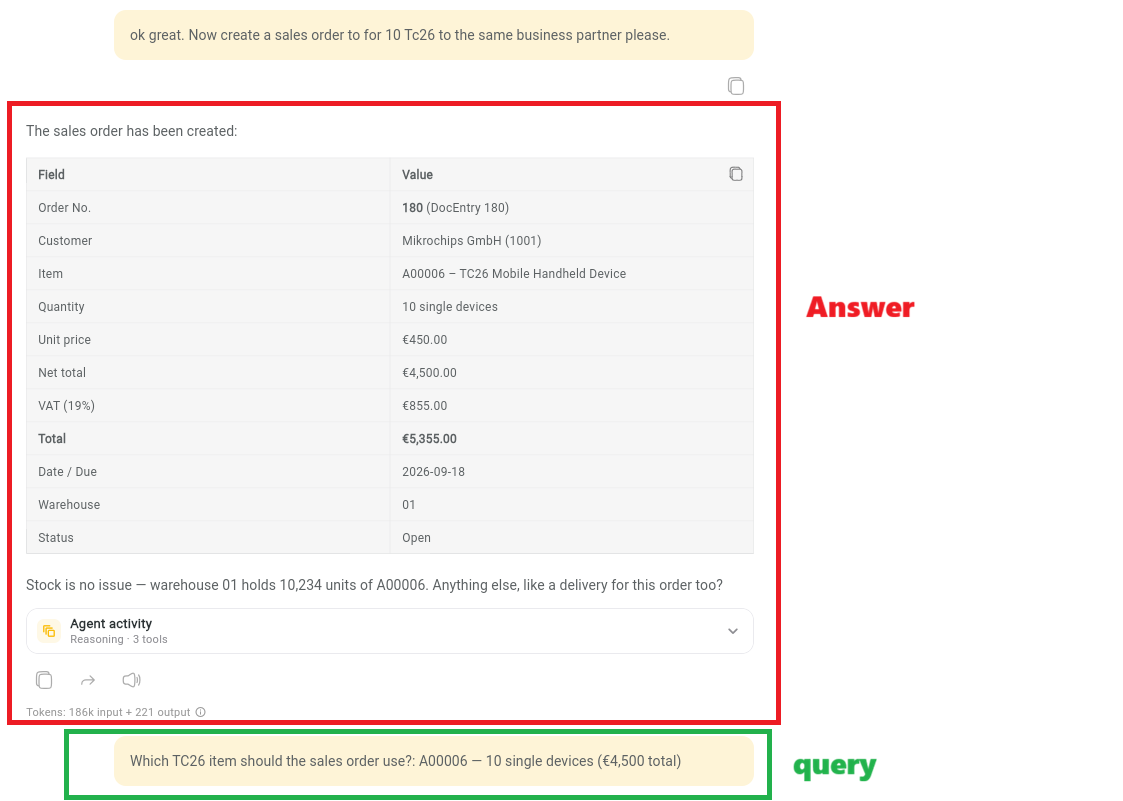
When the AI Assistant asks a follow-up question with selectable options (e.g., choose one of two options and submit), the user's answer box (the input box that appears after "Send" is pressed) moves to the bottom of the chat, and the model's answer is rendered above it. This ordering is confusing: the user's submitted answer appears detached from the question, and the response placement makes the conversation flow hard to follow.
Additionally, after the user submits their answer, there is no visible feedback (no loading indicator, spinner, or status change on the answer box). If the model takes a while to respond, nothing happens after the user's query box — the user may think the app has crashed or the answer was not submitted.
Expected Outcome / Solution:
The follow-up answer box should stay in place (in context with the question), and the conversation should read in natural chronological order: question → user's answer → model's response.
After the user submits an answer, a clear loading/processing indicator should be shown (e.g., spinner, "thinking" state, or disabled input with status) so the user knows the request is being processed.
The chat should auto-scroll to the newest content (the model's response) once it arrives
Status: Completed
Log in to comment and vote
No comments yet
Be the first to share your thoughts.