SAP B1 connection not working
Issue Description:
When trying to use SAP Business one integration in Logiks AI Assistant, I am getting this error:
{error: supported_mcp_not_detected, bound_app_ids: [7], apps: [{id: 7, name: SAP Business One, public_url: https://sap-b1-mcp.logiks.app/, slug: null}], connection_errors: [{app_id: 7, app_name: SAP Business One, error: B1 session expired. Please re-login.}]}
In AI Assistant, Options, Apps, I push SAP Business One and there I see that SAP Business One Service Layer Address is empty and grayed out - I cannot change it.
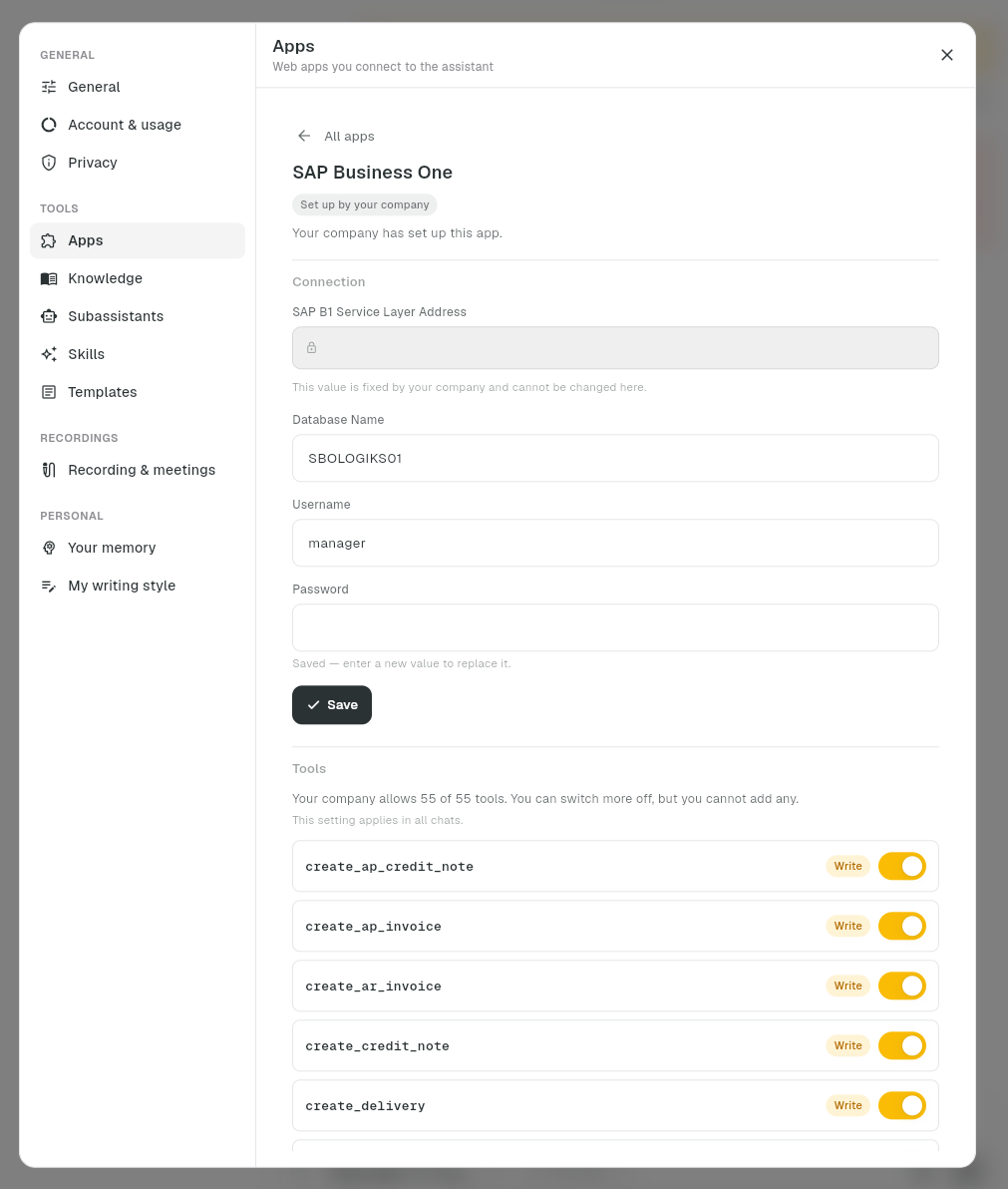
I have tried removing and reconnecting the app, and when reconnecting it did ask for the Service Layer Address, I entered it, however I got the same error. And when going back to settings the Address bar was still empty.
Expected Result:
If there is a problem with connection to the app, the error message should be more clear and written in plain language.
Service layer address should be visible after connecting the app.
If the whole system says that the app was successfully connected or displays no error messages in the process - it should work.
Status: Planned
Log in to comment and vote
No comments yet
Be the first to share your thoughts.